
BENCHMARK™ USER GUIDE
FEATURES
Crossover apex allows seamless attachment to all full-sized ball heads
4 leg angle positions (compared to 3 on Mk2 tripods) with glove-friendly, magnetic pull-tabs
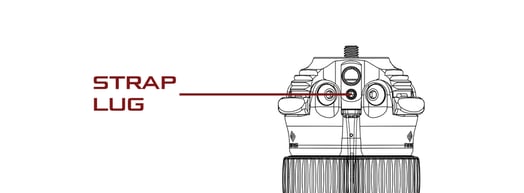
Integrated QD strap socket
2 Additional integrated accessory sockets (1/4-20 and 3/8-16)
Low profile, dust resistant twist locks
1-piece anti-twist sleeve
General Tripod Use
Leg Set Up
- Swing out all three legs to desired position.
- Grab twist locks with one hand, rotate one quarter turn to loosen.
- Pull legs until fully extended.
- Tighten Twist Locks.
- Repeat on all legs.
- To collapse, loosen twist locks and collapse leg. Grab all Twist Locks with one hand and tighten.
Set Leg Positions
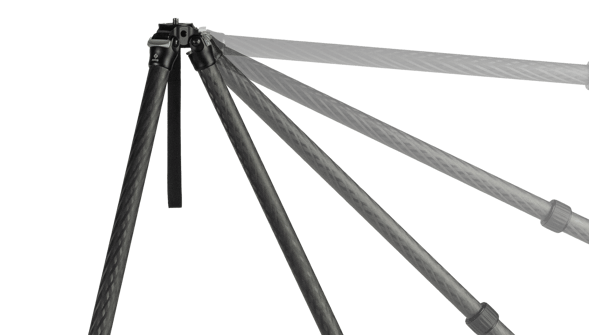
- Swing leg slightly inward.
- Pull magnetic pull tab completely out (push closed at any time to cancel).
- Swing leg to full horizontal position. Angle stop will engage and magnet will bring pull tab back in.
- Move to desired position. Angle-stop will ratchet automatically.
Switching Tripod Heads
Benchmark inverted comes with 3/8” mounting stud installed.
For full size ball heads, simple twist on ball head base until secure against the top of the apex.
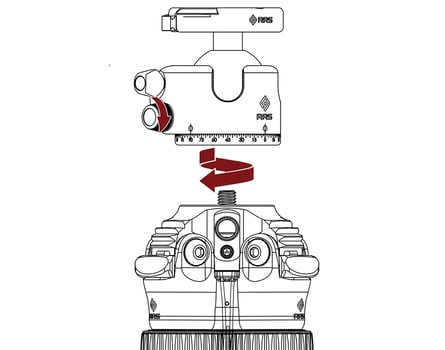
For ANVIL-30
Remove strap lug and strap with included 5/23” hex key
Remove 3/8” mounting stud bolt with included 3/16" hex key
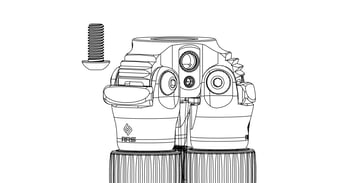
Insert ANVIL-30 into the top of the apex
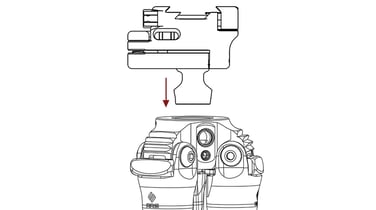
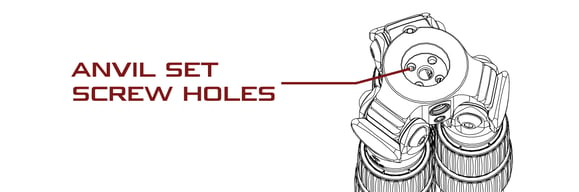
With included 9/64” hex key, tighten all 4 set screws into the adjacent holes on the bottom of the ANVIL-30
Replace strap and strap lug
General Care
Maintenance Tips
When exposing your tripod to mud, sand, or water, use a damp towel to wipe down and dry the legs completely before collapsing.
After submersion into water, it is best practice to remove the lowest leg of the tripod and allow tube to drain if any water persists after towel drying.
Routinely disassemble and clean the tripod periodically to ensure longevity. Instructions on the next page.
Leg bolts should be tight enough to prevent legs from collapsing, but loose enough to open with ease. Use the included 3/16" hex keys to make adjustments as necessary.
Periodically apply multi-purpose grease to the threads of each leg section twist lock. However, never lubricate the carbon fiber legs.
Check for metal corrosion. Contact Really Right Stuff for any necessary replacement parts.
Always keep your tripod in a protective bag when transporting or storing.
Cleaning
- Rinse exterior with fresh water and towel dry.
- Unscrew twist lock and fully remove leg section.
- Remove twist lock, foot, and anti-twist sleeve.
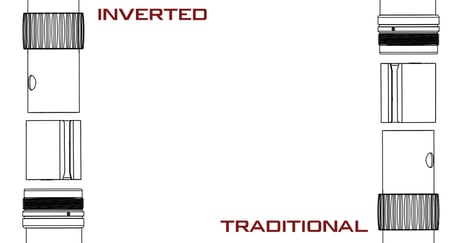
- Wipe down leg, foot, and exposed threads with damp cloth, removing any dirt or debris. Allow to dry.
- Apply a small amount of multi-purpose grease to exposed leg threads.
- Replace anti-twist sleeve and twist lock.
- With anti-twist sleeve in place, insert leg into the tripod where the inner ridges (key way) on both sides of the tube meet with the gaps on each side of the anti-twist sleeve. Slide the leg in a few inches, then screw the twist lock onto the collet.
- Screw Twist Lock and foot back into position. Rotate Twist Lock back and forth to spread grease.
Axle tune-up
- Loosen and remove axle using both included 3/16” hex keys, turning in opposite directions. One screw will stay attached to the axle and one will be loose. Use the hex key to push the axle out of the apex.
- Slide leg out away from apex. The magnetic pull tab will dislodge automatically.
- Keep magnetic pull tabs, washers, and axle and screws in a safe place. If installing a replacement axle kit, set aside the old washer, axle, and screws and replace with the new ones.
- Grease the washers on both sides and stick onto the apex.
- Reinstall the pull tab into the clevis and carefully slide back onto the washers.
- Align all holes and insert axle.
- Reinstall screw and tighten to preferred tension.